01 / PRODUCT INTRODUCTION
Meet your machine.
Built for repair. Ready for creative work.
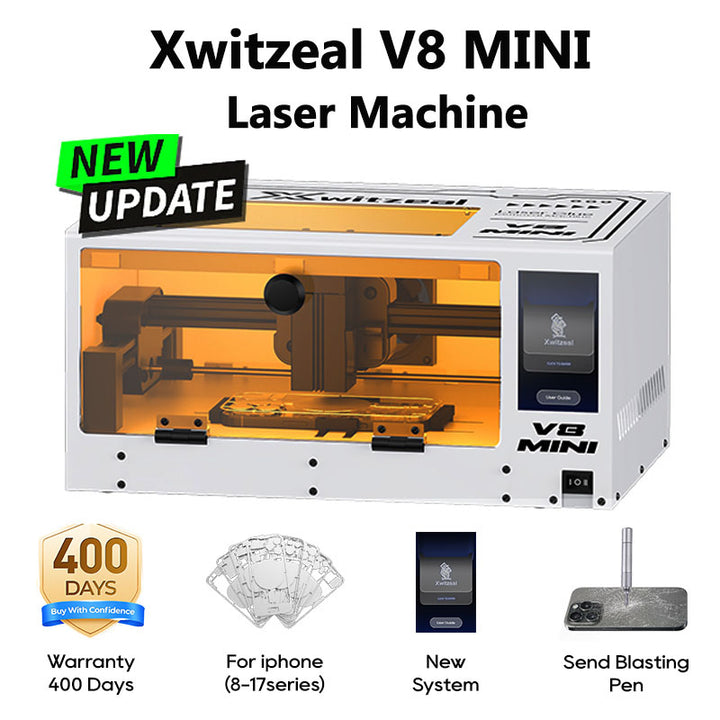
V8 MINI pairs a 5W laser with a white enclosure. The V8 MINI range supports phone back-cover glue removal, phone-frame adhesive removal and DIY engraving on compatible phone accessories, such as phone cases.
Xwitzeal also provides its own engraving software. Engraving requires a setup and compatible material appropriate to that task.
V8 MINI or V8 MINI Pro? V8 MINI has a 5W laser and white enclosure; V8 MINI Pro has a 10W laser and black enclosure. Both use the operating sequence shown below.
02 / USING YOUR MACHINE
How to use it.
Before you begin
One workflow, two models. V8 MINI and V8 MINI Pro follow the same operating sequence. The photos demonstrate the process on V8 MINI.
- Identify the phone model and prepare its matching file, fixture and protective template.
- Follow the laser protection and extraction requirements supplied with your machine.
- Use the settings specified for your machine and task. The shared workflow does not mean that both laser powers use identical settings.
Your first job, step by step.
Follow the eight illustrated steps below for phone back-cover glue removal. Button names match the machine’s touchscreen.
-
Secure the phone
Place the phone in the fixture, then press the clamp button to hold it securely.

Place the phone in the fixture and engage the clamp. -
Set the laser focus
Lower the focus gauge and adjust the laser head height until the gauge reaches the phone’s back cover. Lock the height adjustment, then fold the gauge back up.

Use the fold-down focus gauge to set the laser head height. -
Return to the home position
Tap Home on the touchscreen to position the laser head at its home reference.

Tap Home on the machine’s touchscreen. -
Select the matching phone file
Tap File and select the file for the exact phone model you are working on.

Select the matching phone model using File. -
Preview and check the path
Tap Ready to preview the path. Check that the outline is correctly aligned with the phone before continuing. If the alignment is incorrect, stop and correct the setup before starting a job.

Check the preview outline against the phone. -
Stop the preview
Tap Stop to end the preview before placing the protective template.

Stop ends the preview. -
Fit the protective template
Place the protective template for the phone model over the phone, as shown. Check that it sits in the correct position.

Fit the matching protective template before starting. -
Close the door, then start
Close the protective door fully. With the door closed, tap Mark to start the laser operation. Keep the door closed during operation.

Close the protective door before tapping Mark.


Use the instructions for your exact machine, phone model and task for operating settings and safety requirements.
Ask for model-specific instructions ↗THE XWITZEAL LEARNING DESK
Related tutorials for this machine
Setup, everyday operation and care. Find the guidance for your next repair.
Loading available guides…
03 / FIND YOUR FIT
Why choose it?
Developed by the people who build it
Xwitzeal combines laser manufacturing with equipment development to support ongoing improvements to the V8 MINI range and updates for supported phone models.
More capability in a compact footprint
Bring back-cover glue removal, phone-frame adhesive removal and compatible engraving projects to a compact repair bench setup.
Protective templates included
Protective templates are supplied with the machine to help you prepare supported repair jobs. Choose the template that matches the phone you are working on.
04 / VIDEO GUIDES
Watch it in action.
Continue with the video demonstrations below. The illustrated workflow above applies to both V8 MINI and V8 MINI Pro; use the settings and accessories specified for your machine and task.
05 / YOUR NEXT STEP
Make room for your next machine.
Xwitzeal V8MINI Automatic Laser Glue Removal Machine for iPhone
See current pricing, choose your configuration and review the full product details.
View product & options Need help choosing? Talk to our team ↗